info@zinavo.com
 +91-77602 45945

Introduction
A website represents your brand and promotes trust and which helps you attract new customers. Technology, trends and audience behavior all change over time. If your website isn’t keeping up, you could lose visitors and sales. That’s why you need to redesign your website.
Redesigning the website strategically improves the user experience, boosts SEO ranking and increases conversions.
Our step-by-step guide will explain why you should consider a redesign and how you can do it effectively.
Why Is Website Redesign Important?
A website redesign isn’t just about making your site look attractive, it’s about performance, usability and conversion. An outdated or poorly optimized website can harm your online visibility, frustrate visitors and limit your brand’s growth potential.
Redesigning your site ensures it aligns with your business goals, provides a smooth user experience and helps convert visitors into loyal customers.
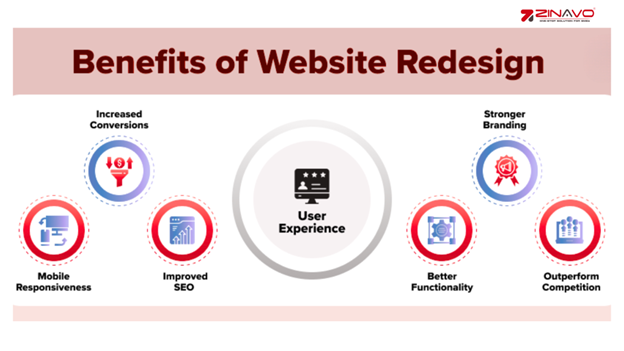
- Keep your design and technology updated.
- Improved the user experience and navigation.
- Boost SEO rankings and website performance.
- Enhances brand credibility and trust.
- Increase traffic, engagement and conversions.
When Should You Redesign Your Website?
The importance of knowing when and how to redesign is just as important as knowing how to do it. Most websites need to be updated every 2–3 years to remain relevant. Signs that it’s time include outdated visuals, low traffic, poor conversions or slow loading times. A website that isn’t mobile-friendly or doesn’t reflect your brand identity needs to be updated.
- Your website looks old-fashioned or cluttered.
- Navigation is confusing or hard to use.
- Mobile users struggle to browse or purchase.
- SEO rankings and traffic are declining.
- Your business or branding has changed.
Step 1: Audit Your Current Website
Analyze how your current website performs before redesigning it. A detailed audit reveals what’s working and what isn’t. Analyze traffic data, user engagement and loading speed. Identify high-performing pages and elements that need improvement.
How to Evaluate Your Website’s Performance:
- Check website speed and performance (using Google PageSpeed Insights).
- Review SEO metrics like traffic, bounce rate and rankings.
- Analyzing user behavior through Google Analytics.
- Identify design or content issues affecting conversions.
Step 2: Define Your Redesign Goals
Successful redesigns start with clear goals. How can you generate more leads, improve user engagement or modernize your brand’s look and feel? Setting measurable objectives helps you and your design team stay focused and track success after launch. The modern look of your business not only attracts new customers but also demonstrates that your business is growing and keeping up with the latest trends. Refreshing your brand’s visual identity can differentiate you from your competitors and create a memorable impression on your audience.
Why Your Business Needs a Website Redesign
- Increase website traffic and visibility.
- Improve lead generation and sales.
- Enhance brand identity and credibility.
- Provide better mobile and desktop experience.
- Strengthen SEO and content structure.
Step 3: Research Your Audience and Competitors
It is important to focus on the users when redesigning your website. Discover what your target audience likes, what they dislike and what causes them frustration. Analyze your competitors’ sites to discover design layouts, features and content strategies that work in your industry.
- Identify your target audience demographics.
- Understand user expectations and needs.
- Analyze competitor design trends and keywords.
- Find opportunities to stand out from the competition.
Step 4: Plan Your New Site Structure
A well-organized site structure makes navigation easy for users and search engines. Create a sitemap outlining how pages connect. Make it easy for visitors to find information by prioritizing simplicity and logical flow.
- Create a clear and intuitive sitemap.
- Define key pages (Home, About, Services, Blog, Contact).
- Keep navigation simple and user-friendly.
- Use internal links to improve SEO and user flow.
Step 5: Revamp Content Strategically
Content is the foundation of your website. Whenever redesigning a page, make sure the existing information is reviewed and updated if it is outdated or irrelevant. Optimize all content with keywords and engaging headlines. Write with clarity, highlight your USP and include strong calls to action (CTAs).
- Rewrite the outdated or low-performing content.
- Use relevant keywords for SEO optimization.
- Add clear CTAs to drive conversions.
- Include testimonials, case studies and visuals for trust.
Step 6: Focus on Mobile and Speed Optimization
Mobile traffic dominates the web so your site must perform Effortlessly on all devices. A slow, non-responsive site can drive away users and hurt SEO. Use responsive design techniques and optimize images, scripts and hosting for faster loading.
- Ensure full mobile responsiveness.
- Compress images and minimize code.
- Use caching and CDN for faster delivery.
- Test site performance across all devices.
Step 7: Implement SEO Best Practices
Redesigning your site is the perfect time to enhance SEO. Make sure all important URLs, metadata and backlinks remain unchanged. Optimize title tags, meta descriptions and alt text for new content. Structure your website to make it easier for Google to crawl and index.
- Maintain existing high-ranking URLs with 301 redirects.
- Optimize meta tags, titles and headings.
- Add alt text to all images.
- Use schema markup for better search visibility.
Step 8: Choose the Right CMS & Hosting
Reliable CMS (Content Management System) with a reliable hosting platform ensures flexibility, speed and security. WordPress, Shopify or custom-built solutions can be customized to your business needs. It is essential to pair it with a reliable and high-performing hosting provider for maximum performance.
- Choose an SEO-friendly CMS like WordPress.
- Use cloud or VPS hosting for better performance.
- Ensure easy scalability for future growth.
- Keep regular backups and strong security features
Step 9: Test Before Launch
Test your website thoroughly before launching it so that every feature works as expected. Check navigation, responsiveness of forms and functionality across different browsers and devices. A detailed quality check avoids errors that could affect user trust or conversion.
- Test across all major browsers (Chrome, Safari, Edge, Firefox).
- Check the contact forms, links and CTAs.
- Verify page loading speed and responsiveness.
- Fix any bugs or visual inconsistencies.
Step 10: Launch & Promote Your New Website
Once everything has been approved and tested, it is time to go live. Announce your new website on all social media, email newsletters and Google My Business. Highlight the improvements you’ve made to encourage visitors to explore the new site.
- Announce the launch on social media platforms.
- Send a newsletter to your audience.
- Update your GMB profile and other directories.
- Run a small ad campaign to boost visibility.
Post-Launch Optimization
Monitor the performance of your website closely after it launches. Analyze user behavior, traffic and conversions with analytics. Continue updating your content, images and SEO to keep your site fresh and relevant. Regular optimization ensures consistent growth and engagement.
- Track performance via Google Analytics.
- Monitor conversions and visitor trends.
- Update blogs and pages regularly.
- Continue link building and content marketing.
Conclusion
A website redesign is more than just a visual upgrade it’s a strategy to improve performance, usability and growth. The following checklist will help you make sure your new website looks great, performs better and drives real business results. Analytics play a crucial role in the success of your website by providing valuable information into user behavior and engagement. Analyzing data from tools like Google Analytics can help you identify which pages are performing well and which require improvement. It enables you to make informed decisions regarding content updates, design changes and marketing strategies to enhance the user experience and drive conversions.